Set Configurations
NOTE: These functions are in development and will be described at a later date.
Configuration Expander
- Click Settings
 .
.
- The expander Configuration opens.
- Enter the values for the BIM Viewer configuration (see Expander Configuration section for additional details).
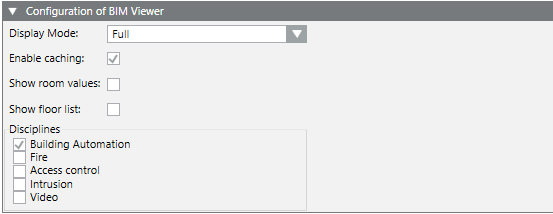
- Enter the values for the Graphic configuration (see Expander Configuration section for additional details).

- Click Save
 .
.
- Click Settings .
- The Configuration expander closes.
Customizing Product Mapping Table

The Product Mapping Table (ProductMapping_HQ.csv ) must be customized to avoid data loss when Desigo CC is updated.
- Select the file at location [Project name]\libraries\BA_Software_Desigo_BIM_Viewer_HQ_1\AssociationRules\ProductMapping_HQ.csv.
- Make a copy of the file ProductMapping_HQ.csv.
- Rename the copy of the file to ProductMapping.csv. It is not overwritten when updating a project.
- Edit the file ProductMapping.csv for customization. Content details see Modifying the Product Mapping Table. The separators for the columns is in Windows Region settings > Time and region > Region > Number format under Additional settings and can be edited as needed.
Information
You have to manually merge a customized ProductMapping.csv with an upgraded ProductMapping_HQ.csv to make potential new features available (see also Readme_for_Customizing.txt in the library BA_Software_Desigo_BIM_Viewer_HQ_1 of your project).
See also
